
How to Boost AD Performance with AI: 8 Best Ways
5 min

5 min
#1 AI Improves Ad Targeting
Even your best ad is a waste until it reaches its exact targeted audience. Think of it like, what’s the point of having the best chicken recipe when it’s reaching to the vegetarians? You may have the best services, but how will you reach those people who need those services?
This is where AI comes in. It understands your content, vibe, niche, behaviour, and thought process and suggests your content to your audience accordingly.
This is what AI analysis has so far:
1. Data Collection and Integration
2. Data analysis
3. Audience Segmentation
4. Predictive Modelling
5. Refinement and Optimisation
#2 AI-Powered Ad Optimisation
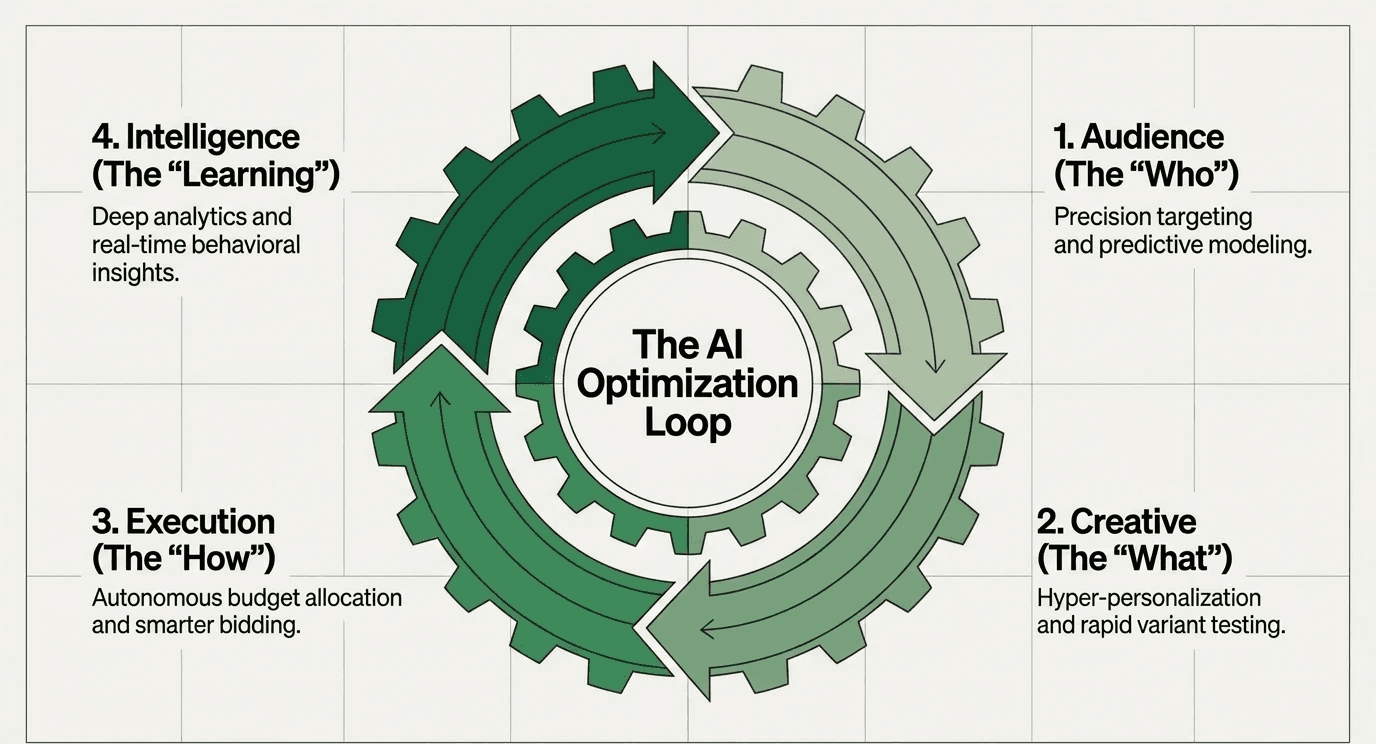
AI advertising optimisation may sound complicated, but it’s not; it’s just the use of automation and machine learning tools to make ad campaigns more efficient and personalised. It leverages machine learning to assess large amounts of data to identify trends and patterns to improve campaign performance.
It analyses millions of data points in seconds, and consistently learns from patterns, customer behaviours, and industry trends to continuously improve your ad campaigns.
Also read: 10 genius ways to use AI avatar for your brand
#3 Use AI to Optimise Your AD Spend
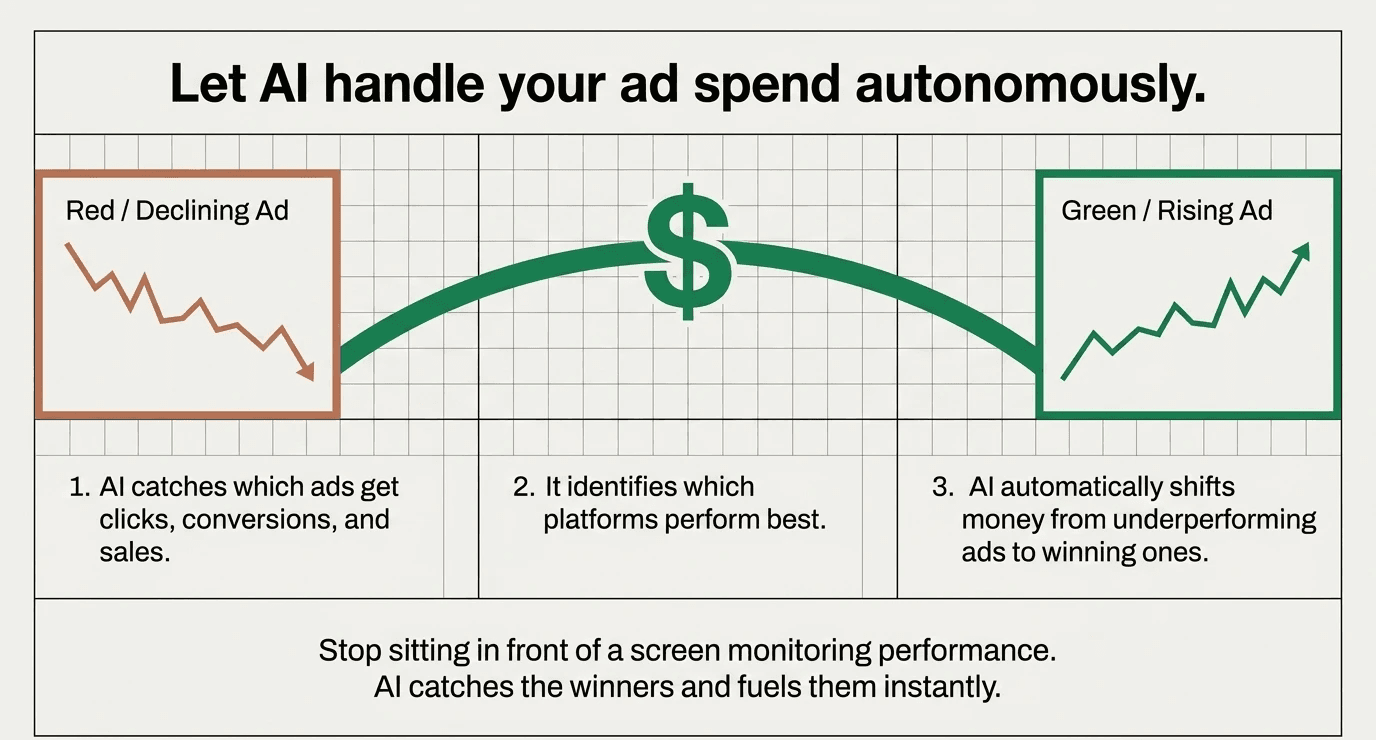
You are burning your money on the wrong ad if you are not using AI to optimise your ad spend. Take a breath and let AI handle your AD spend. AI automatically watches your ad campaigns and moves money to the ads that are working. You don’t have to sit in front of a screen and monitor the performance for hours, let AI do it, and AI will do it better than you because AI can monetise it 24/ and you can’t.
How it works:
1. AI catches which ads get clicks, conversions, and sales.
2. It identifies which platforms perform best.
3. AI shifts money automatically from underperforming ads to winning ones.
#4 AI-Powered Bid Management
An AI-powered bid management system is just a tool that uses artificial intelligence technologies like machine learning, predictive analytics, and analysis to optimise the whole bidding process.
Benefits of AI-powered bid management:
1. Smarter decision-making
2. Time and cost efficiency
3. Predictive analytics
4. Improved pricing strategies
5. Real-time insights
#5 AI Personalises ADs for Customers
You may have a certain audience for your whole brand, but not every customer will align with your every service and ad. People have different mindsets, uses, lifestyles, and vibes. AI shows different ads to different people based on their interests. Like who they are, and what they like.
Think of it like this:
Nike shoes ad goes to 3 types of people, and 3 of them see the product according to their needs:
1. Runeer sees: “Built for speed”
2. Gym person sees: “maximum support, crush my workout”
3. Casual wear sees: “comfort that looks good”
Same shoes, different reasons to buy. So use AI to build personalised ads that can target mass audiences with different USPs that match their lifestyles.
#6 Use AI Tools to Test Different AD versions
Experimentation is the best way to find new and better things. So just give your new service or product brief to AI and let AI create and test multiple versions automatically. It will find the best one and will scale it automatically.
Take this as an example:
You are a SaaS startup project management software, and you just want to show how easily AI can automate those things. You are burning your money, efforts, and time. You gave AI the brief, and it gave you these 4 versions:
Version 1: "Manage Projects Faster with AI”
Version 2: “Your Team Deserves Better Tools”
Version 3: “Stop wasting time on a spreadsheet”
Version 4: “You are just wasting your money on a Big Team”
After 1 week, version 2 converts 2x better, so AI automatically scales version 2 and stops the others.
Also read: 5 reasons why your video production sucks.
#7 AI Automates Your AD Management
If you are still managing your ADs manually, you are already out of the race. You are wasting your time in monitoring, adjusting or managing old ads, so when will you think about creating new ones? So let AI do the monitoring and management.
AI handles the daily hustle of running your ads. It manages campaigns, pauses underperformance, and adjusts settings according to needs, without BOTHERING YOU.
Why is it important?
1. You focus on strategy, AI handles execution
2. No more manually monitoring
3. Faster response to performance issues
4. Consistent monitoring and optimisation, and by "consistent," I mean 24/7
#8 AI Analytics
You may monitor and analyse your data, but you can’t do it better than AI. Tech can understand tech. AI takes all your ad data like clicks, conversions, spend, engagement and explains what it actually means, in the easiest way possible.
Take this as an example:
Your startups run ads across Google and Meta. You can only analyse these things:
5,000 clicks
250 conversions
$2,500 spent
5% conversion rate
And AI can analyse these:
"Your Tuesday ads convert 40% better than Wednesday"
"LinkedIn traffic costs 3x more but converts 2x better"
"Mobile users click more, but desktop users buy more"
"Your competitor's new campaign dropped your CTR by 15%"
Conclusion
You have a golden chance to boost your ad performance with AI, and you are missing it. We have discussed about 8 ways to use AI for ad boosting. You don’t need to do this alone, instead let’s come together to boost your ad performane & ROI & grow your brand.
Motion.labs visit now.
FAQ
1. Do I need to be tech-savvy to use AI analytics?
No. Most AI analytics tools have simple dashboards that show insights in plain English. You don't need to code or understand complex formulas.
2. How long does it take to see results from AI analytics?
Usually 1-2 weeks. AI needs data to spot patterns. The more data it has, the better insights it gives.
3. Is AI analytics expensive? Not really. Google Analytics 4 is free. Meta Ads Manager is free. Premium tools like Tableau start at $70/month but are optional.
4. Can AI analytics predict which ads will fail before I launch them?
Partially. AI can flag risky ads based on past patterns, but it can't predict 100%. You still need to test and learn.
5. What if I'm using multiple ad platforms
AI analytics tools pull data from all platforms into one dashboard. You see everything in one place instead of jumping between platforms.
Give us a call
Related Blogs
SaaS Video Editor Jobs in San Francisco: What to Know Before You Apply
GPT-6 Astra and California tech hiring: what employers should change in 2026
Digital marketing jobs in the USA for freshers: roles, salaries, and how to actually get hired
Best AI Hiring Agency in the US: How to Choose the Right Partner in 2026
Claude AI as a Job Search Agent: What It Can (and Can't) Do for Job Seekers in the USA
Junior backend developer jobs in San Francisco: where to look and how to get hired
Top 10 IT Recruitment Agencies in California (2026)
WordPress developer jobs in the US: how hiring agencies actually fill them
AI UGC Video Editor Hiring Agency in San Francisco | TheFutureJobs
Content marketing jobs in Texas and New York: what hiring agencies are actually filling in 2026

Team
Legal
Privacy Policy
Legal & Rights